Reports and Documents
Report for Artists With Consigned Products
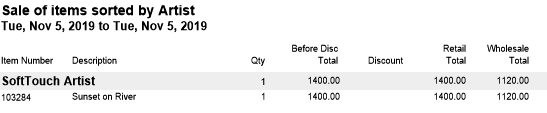
This report shows all artwork consigned to you by an artist which has sold over a given period of time.
-
Date on page shows first and last sale dates. Totals show the amount owed the artist and which pieces have sold.
-
This report can also be printed with one artist per page. This makes it easy to give each artist the list of items sold and their payment for the art.
-
In order for items to appear on this report, they must be entered into the Products file, with the artist's name entered in the Artist field under the Artwork tab, and the Consignment checkbox must be marked. Then, the item must be added to the Invoice using the product's item number.
Items which are not in the Products file or have been hand-typed onto an Invoice will not appear on this list.
How to Print a Report for Artists With Consigned Products
-
On the Main Menu, in the Invoices section, click the Sales Reports button.
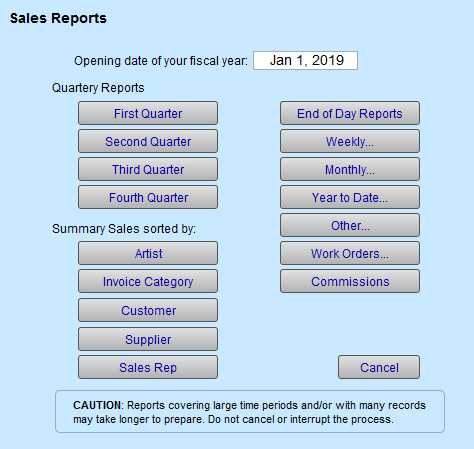
The Sales Reports window appears. -
Select the Summary of Sales sorted by Artist.
-
Enter the date range for the period of sales.
Check the Consignment box.
Leave the Artist field blank to select all artists or create a report for one specific artist by selecting their name from the drop-down list. -
Select Proceed.
-
Click Continue.
OR
-
On the Main Menu, in the Invoices section, click the Consignment Report button.
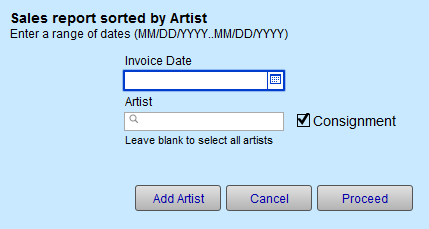
The Sales Report sorted by Artist window appears. -
Enter the date range for the period of sales.
The Consignment box is automatically checked.
Leave the Artist field blank to select all artists or create a report for one specific artist by selecting their name from the drop-down list. -
Select Proceed.
-
Click Continue.
Example Consignment Report